Signal Restricts Screenshots to Keep OS AI Agents Out of Private Chats
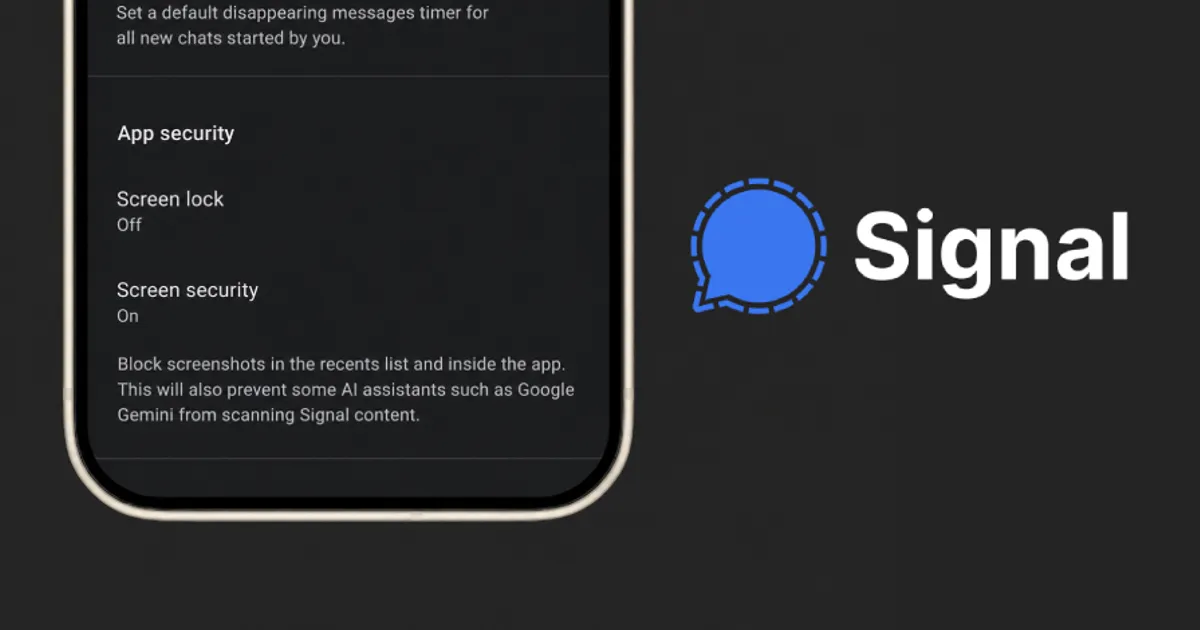
Signal now blocks screenshots by default on Android and iOS to stop built-in AI agents from reading private chats, while admitting the protection does not close every gap.
⚡ Why it matters
OS-level AI agents get broad access to screens and notifications, which can pull encrypted conversations outside the app's protection and expose everyone in a chat.
Signal is turning on screenshot restrictions by default on Android and iOS to keep AI agents from reading users' private conversations. The protection covers agentic features built into iOS 27 and Android versions where Signal can detect an AI assistant trying to read its screen.
The change extends a similar setting Signal shipped for Windows 11 after Microsoft introduced Recall.
Why Signal is doing this
Signal Foundation president Meredith Whittaker described OS-level agent integrations on Android, iOS and Windows as an "existential threat" to the app. These agents scan whatever is on screen to answer questions and carry out tasks, and they may keep that data locally or on remote servers, beyond Signal's control. That, Signal argues, weakens its ability to guarantee privacy on its own.
An incomplete fix
Signal concedes that blocking screenshots does not stop other routes an agent could take, such as reading content already stored on the device through the file system. It is asking platform makers for two things:
- A simple, documented way for apps to opt out of AI data access and processing entirely, covering screen reading, file access, notifications, APIs and other OS frameworks.
- Clearer documentation and technical specifications on how AI agents access and process data.
The concern has precedent. Reuters reported that Meta's Muse agent reached Signal messages on a Mac through accessibility and screenshot tools, and on Android by reading push notifications, relying on the wide permissions granted during setup.
Controlling the setting
The option lives under Settings > Privacy > App Security, as "Block Siri AI" on iOS or "Screen security" on Android. Signal warns that switching it off may expose chat content to these agents.
Recommendations
- Keep Signal's screen protection setting enabled.
- Review the permissions granted to AI apps and agents, especially accessibility and notification access.
- On iOS 27.2, consider the Excluded Apps option to limit which apps Siri can reach, and review Connected Apps in Gemini.
Source: The Hacker News
🔗 Sources
This article is original reporting by the Security World editorial team based on the sources listed above; direct quotes are kept short and marked with quotation marks. Corrections and feedback: info [at] securitywd.net.
Related stories

FBI Probes Apparent Breach of NCIC National Crime Information Database
The FBI is investigating an apparent hack of NCIC, the criminal justice database used by US law enforcement agencies. The scope of the incident is still unclear.
Rackspace Spot Breach: Leaked Credentials Exposed Kubernetes Secrets
Attackers used leaked credentials to access Rackspace Spot on Nov 17, creating pods and reading Kubernetes Secrets in some customer clusters. Rotate credentials now.
Microsoft Entra Connect Health API Flaw Exposed Admin Emails and Tenant Data
Microsoft says attackers abused an Entra Connect Health API bug to read admin emails and tenant metadata. A server-side fix is live; phishing risk remains.